Creating Your Account
Get started with TSL Toolbox by creating your account
Creating an account with TSL Toolbox is quick and straightforward. This guide will walk you through the registration process, account types, and initial setup steps.
Before You Begin
Make sure you have a valid business email address and know which type of account you need (individual user, company user, or company administrator).
Account Types
TSL Toolbox offers different account types to match your role and needs:
Basic User
For individual users who need essential TSL Toolbox features.
- Access to core platform features
- Limited platform integrations
- Personal settings management
Company User
For team members within a company account.
- Full platform access
- Company-specific settings
- Collaboration features
- Role-based permissions
Company Admin
For managers who need to administer company accounts.
- Full platform access
- User management
- Billing and subscription control
- Company-wide settings
- Advanced analytics access
Choose Wisely
Your account type determines your access level and permissions. If you're setting up TSL Toolbox for your company, you should register as a Company Admin.
Registration Steps
Visit the Registration Page
Navigate to the TSL Toolbox registration page or click the "Register" button in the top navigation bar of our website.
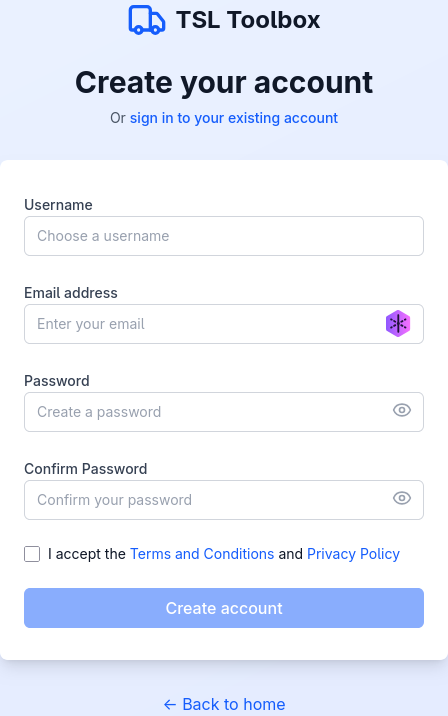
Enter Your Information
Fill out the registration form with your details:
- Username: Choose a username for your account
- Email Address: Use your business email address
- Password: Create a secure password (minimum 8 characters with letters, numbers, and special characters)
Tip: We recommend using your business email address for easier verification and team collaboration.
Verify Your Email
After submitting the registration form, you'll receive a verification email. Click the verification link in the email to activate your account.
If you don't see the verification email in your inbox, check your spam or junk folder. The email should arrive within a few minutes.
Complete Your Profile
After verifying your email, you'll be prompted to complete your profile with additional information:
- Personal details (name, job title)
- Contact information
- Preferences for platform usage
Completing your profile helps us personalize your experience and ensures you get the most out of TSL Toolbox.
Choose Your Subscription
If you're registering as a Company Admin, you'll be prompted to select a subscription plan for your company.
- Review available plans and features
- Select the number of user seats needed (for companies only)
- Choose billing frequency (monthly or annual (additionally quaterly for companies))
- Enter payment information
Note: Basic users can access limited features without a subscription. Company Users are added to an existing company subscription by their admin.
INFO: We do not store any payment information. All payments are handled by payment providers.
Account Security
Protect your TSL Toolbox account with these security best practices:
Security Recommendations
- Strong Password: Use a unique password with at least 12 characters, including uppercase letters, lowercase letters, numbers, and special characters.
- Regular Updates: Change your password periodically (every 3-6 months).
- Secure Access: Only access TSL Toolbox from secure devices and networks.
- Log Out: Always log out when using shared computers.
- Contact Support: If you suspect any unauthorized access to your account, contact support immediately.
Next Steps
Need Help with Registration?
If you're experiencing any issues during the registration process, our support team is ready to assist you.
Contact Support